AI QA check on every report
Before you issue, AI scans your completed assessment and flags inconsistencies, missing controls, weak descriptions and gaps. A second pair of eyes on every report you sign your name to.
One system for independent consultants and teams. Less admin around assessments, more capacity to take on clients or finish the day on time.
Saved comments, load from previous, branded PDFs, a client portal per site, and import your existing Word templates in minutes.
14-day free trial. No card needed to get started. Cancel any time.
Already have an account? Sign in
Safety manager? Lytom Comply is the safety management system for businesses.
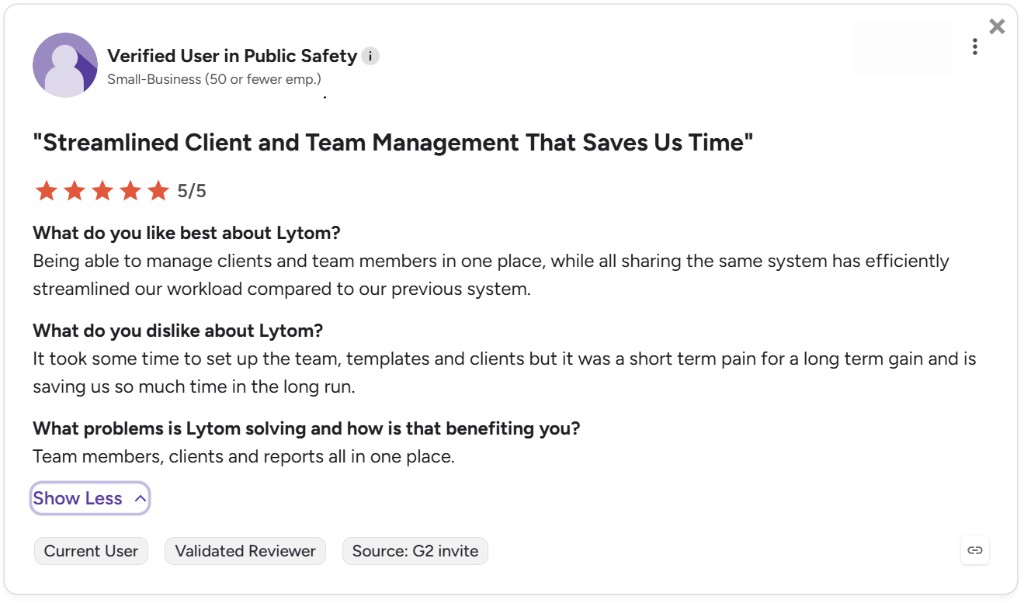
G2 verified review · 5/5. “Streamlined our client and team management in one shared system.” Read the full review on G2
Same controls and dialogs as the app. We use a fire risk assessment as the example — try one control below.
Fire doors are unobstructed and close fully
Interactive demo · same layout as the app
Fire is used here to demonstrate the workflow. In the app you can create any type of risk assessment, not only fire-related work.
This demo shows one control. In the full app, every assessment works the same way:
The saved comments in this demo are examples. In the app you build and edit your own library.
Walkthrough of Lytom Assess on web
A risk assessment app and software platform built for independent health and safety consultants and small consultancy teams. Run assessments on site from an iOS app or any web browser, issue branded PDF reports, and manage every client through a built-in client portal.
Lytom Assess generates your template, suggests corrective actions, drafts hazard text from site photos, writes your executive summary and QA-checks the finished report. You decide what stays and when it goes out. Read our position on AI →
Before you issue, AI scans your completed assessment and flags inconsistencies, missing controls, weak descriptions and gaps. A second pair of eyes on every report you sign your name to.
AI reads the full report and writes a clear executive summary your client can scan in thirty seconds. Edit before you issue.
Type something like “office fire risk assessment” and AI generates a complete, in-depth template with the relevant hazards, controls and structure. Amend to fit the site, instead of starting from blank.
Describe a hazard once. AI suggests corrective actions you can keep, edit or replace.
Need a section clearer for a non-technical reader, or tighter for an executive audience? AI rewords any field. You keep the final word.
AI from site photos: Attach photos in an action dialog and AI can draft hazard text from what it sees. You verify on site before saving — AI can miss details or get things wrong. You sign every report. Read our position on AI →
Going deeper: read our guide on where AI helps in risk assessment, where it doesn’t, and how to QA the output. A practitioner’s view including a 7-point QA checklist for any AI-drafted assessment.
Day-to-day workflows that take the admin out of risk assessment work. See how it works for consultants, included client portals and branded PDFs.
Load the previous assessment for the same client and site, then continue from where you left off. Less retyping on routine inspections, with a clear history of what changed between visits.
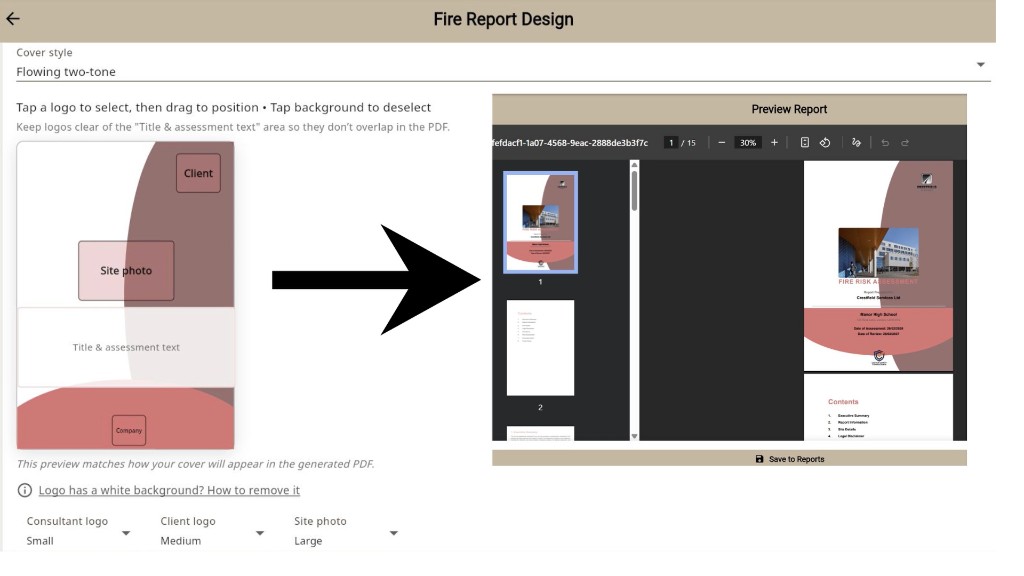
Set your cover style, logo and colours once. Every report leaves your consultancy looking the part, with consistent presentation across the team and across the year.
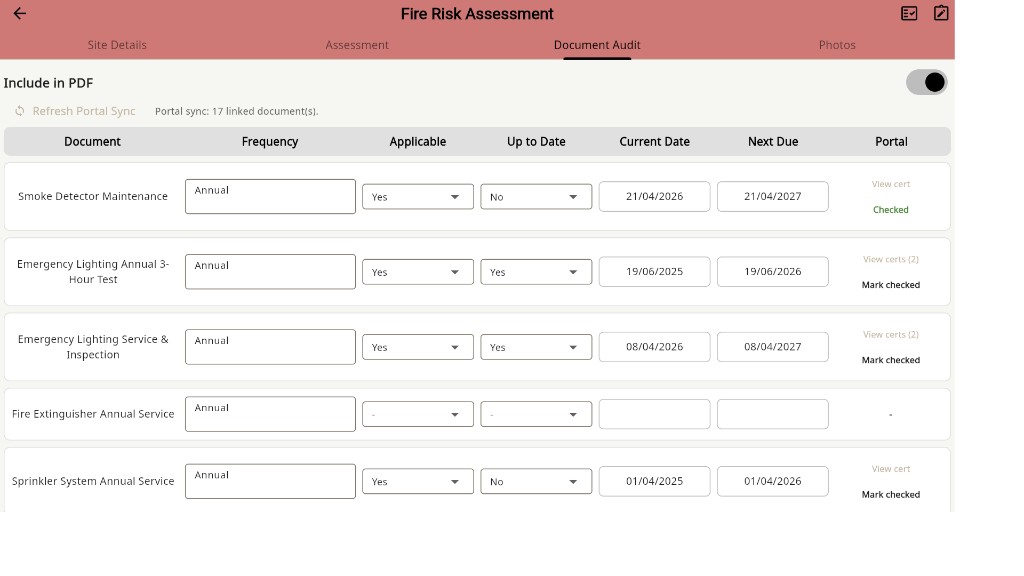
Portal documents flow into the linked assessment with inspection dates and document lines pre-filled. Review and confirm, instead of retyping the same details for every visit.
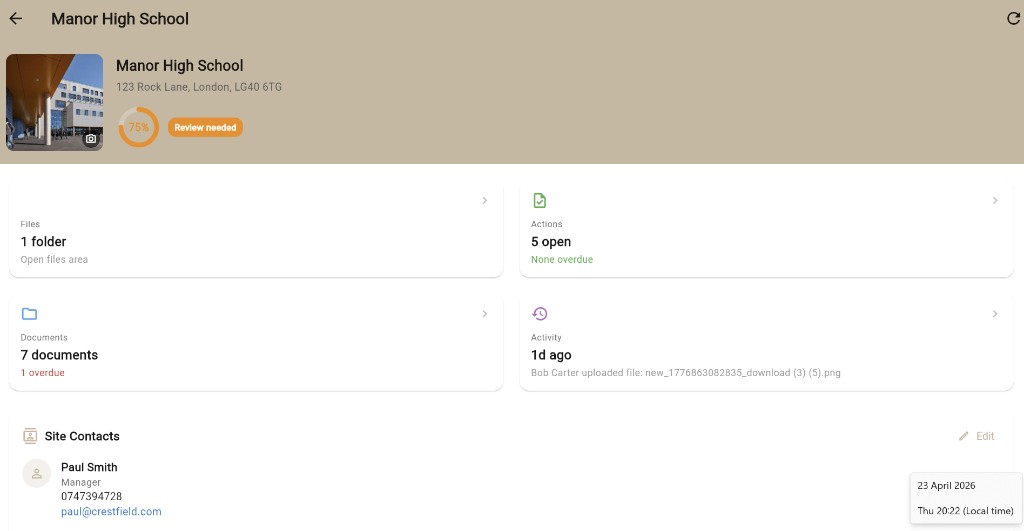
Issued reports appear automatically. Outstanding actions stay tracked. Documents stay accessible. Replace the email-attachment cycle with a permanent shared record between you and your client.
Set up your consultancy once, then reuse the same toolkit across every client site.
Built-in templates for general H&S, fire, water, asbestos, working at height, COSHH and environmental work. Add your own and edit per client site.
Preview exactly what clients will receive before issuing. Adjust cover layout, logo placement and section ordering to match your house style.
Already have templates built in Word? Upload your existing .docx file and Lytom reads the structure (categories, controls and document lines) and transfers it automatically. Your existing work is ready to use from day one, no rebuilding from scratch.
G2 is an independent software review site where verified users rate products they actually use.
Being able to manage both our clients and our team members in one place with a shared system has helped streamline our workload.
Lytom comes from years in corporate health and safety, where good software existed but was out of reach for most independent consultants.
Works worldwide. Default templates reflect common UK practice. Edit every template, report section and legislation reference for your jurisdiction.
I spent most of my career working as a health and safety consultant for major corporations. In that environment, if you need a workflow optimized or a reporting bottleneck fixed, you turn to an IT department. Those companies either have their own team of developers or they throw millions at enterprise software vendors to maintain their platforms.
When I left the corporate world to set up as an independent consultant, I hit a massive wall.
The software available to independent professionals and smaller teams was miles behind what I was used to using. There was no single place to run a business. Instead, you had to cobble together individual tools across entirely different platforms. You had to use one tool for the assessment, one for the report, and another for tracking actions.
Worse, this fragmented setup was being passed straight down to the clients. They were left trying to manage their health and safety compliance across a messy mix of emails, loose PDFs, and scattered spreadsheets.
Lytom was not built to join a crowded market of generic template generators. It was engineered to give independent consultants and growing teams the same level of technical capability, speed, and reporting depth as the biggest corporations.
Crucially, it solves the problem for both sides of the relationship. It allows consultants to complete site assessments and issue polished, branded reports instantly. At the same time, it automatically gives their clients a dedicated compliance portal to track actions, manage documents, and stay audit-ready between visits.
Quick answers consultants and clients ask before signing up.
Lytom Assess is a risk assessment app and software platform built for independent health and safety consultants and small consultancy teams. It lets you run assessments on site from an iOS app or any web browser, issue branded PDF reports, and manage every client through a built-in client portal.
Both. Lytom Assess is available as an iOS app on the App Store and as a web app that runs in any modern browser on Windows, Mac, iPad, Android tablet or phone. The same account, clients, templates and reports are available across every device.
Yes. Consultants use Lytom Assess internationally. Built-in templates often reflect UK practice, but you can edit assessment structures, report sections, custom fields and legislation references for your jurisdiction. Build your own templates from scratch or adapt the defaults with AI-assisted drafting you review before issuing.
Lytom Assess is purpose-built for independent H&S consultants and small teams. It includes templates for fire, COSHH, asbestos, working at height, water and legionella, environmental and general H&S assessments, branded PDF report generation, a client portal for every site, and AI-assisted drafting and QA.
No. Start your 14-day free trial without a card. Add payment from Settings when you are ready to subscribe.
Yes. Lytom Assess offers a 14-day free trial. No card needed to get started. Cancel any time.
Lytom Assess includes built-in templates for general health and safety, fire, COSHH, asbestos, working at height, water and legionella, environmental assessments and safety audits. You can also create custom assessment types and build templates manually in the template editor or generate them with AI, edit before use, and reuse across clients.
Yes. You upload your consultancy logo, set your primary colour and cover design once, and every PDF report issued by anyone on your team carries the same branding. Reports leave your consultancy looking like you produced them, not like a software printout.
No. Lytom Assess includes a Word import tool. Upload your existing .docx risk assessment template and Lytom reads the structure (categories, controls and document lines) and transfers it automatically. You review everything before saving. Your existing templates are ready to use from day one.
Yes. Lytom Assess is GDPR compliant. Data is encrypted in transit and at rest, and the platform follows recognised data-protection handling practices. See the privacy policy for full detail.
Yes. The Lytom Assess iOS app is designed for site work. You can capture findings, take photos and complete assessments on a phone or tablet, and issue reports from any device when you are back online.
Lytom Assess is built for independent health and safety consultants, sole practitioners and small consultancy teams (typically 1 to 10 consultants) who issue branded risk assessment reports to clients and want a client portal included rather than bolted on.
Lytom Assess is the consultant app. Health and safety consultants use it to run risk assessments and issue branded PDF reports to their clients. Lytom Comply is the portal those clients use day to day. Clients track PPM schedules, fire doors, incidents, permits, water logs and their own in-house risk assessments. The two products share data. Assessments and actions raised by the consultant in Lytom Assess appear in the client's Lytom Comply portal automatically.
Lytom Assess is built for independent health and safety consultants who do general H&S, fire, COSHH, asbestos, water, working at height and environmental assessments across many sectors. HandsHQ is template-led and most often used by construction consultancies who need method statements alongside their RAMS. Lytom Assess includes a built-in client portal, AI-assisted drafting and QA on every report, and a native iOS app.
SafetyCulture (iAuditor) is a global inspection platform built for large enterprises with many integrations and a wide marketplace of templates. Lytom Assess is built specifically for independent health and safety consultants. It comes with practical templates for fire, COSHH, asbestos, water, working at height and other common assessment types, a branded PDF report builder that suits consultancy work, a client portal for every client site, and AI-assisted drafting throughout.
When your client also uses Lytom Comply, the assessments and actions you raise in Lytom Assess appear in their portal automatically. No emailed PDFs, no chasing. The connection between the two is Lytom Linked.
For independent health and safety consultants. Run risk assessments on site, issue branded PDF reports and manage every client.
Current pageFor businesses. Track PPM, fire doors, incidents, permits, water logs, custom registers and in-house risk assessments across every site.
Visit Lytom Comply →Three tools, three different buyers. Where Lytom Assess fits, and where it does not.
| Feature | Lytom Assess | HandsHQ | SafetyCulture (iAuditor) |
|---|---|---|---|
| Built for | Independent H&S consultants and small consultancies who sell reports to clients | Construction consultancies and contractors producing RAMS | In-house operations teams running their own inspections at scale |
| What you deliver to your client | A consultancy-branded PDF report, sent into the client's Lytom Comply portal | A construction-style RAMS document | An internal inspection record, exported as PDF or shared by link |
| Client portal per client site | Yes, included. Every client gets their own Lytom Comply area with reports, actions and documents. | Not built in. RAMS distribution is by PDF or link. | Sites and teams inside one workspace. Not designed as a per-client deliverable space. |
| Branded report design | Set your consultancy logo, cover design and brand colour once. Every report goes out as your brand. | Branded RAMS documents. | Configurable per template. Output styled as inspection records. |
| AI-assisted drafting | AI scoped to consultant work: template drafts, executive summaries, suggested actions, on-field rewording, automated QA on every report. | Light AI assistance. | AI assist on inspection findings and action suggestions. |
| Statutory templates (fire, COSHH, asbestos, water, WAH) | Yes, all built in | Construction-led templates | Global template library, broader scope |
| Native iOS app | Yes, on the App Store | Web-first with mobile use | Yes, iOS and Android |
| Free trial | 14 days, cancel any time | Demo on request | 30-day free trial of paid plans |
Start a 14-day trial and try it on a real client site.
Already have an account? Sign in