Your health & safety compliance.
All in one place.
Every compliance record, every site, in one place. Fire safety, asbestos, legionella, maintenance schedules, incidents, permits, custom registers and risk assessments. Golden thread, safety cases and mandatory occurrence reporting for higher-risk buildings under the Building Safety Act. Less repeated admin. No more chasing spreadsheets. Audit-ready when you need it.
Works worldwide. Edit modules, inspection templates and risk assessments to match your local legislation and how your team works.
Multi-site compliance dashboard PPM, fire doors, incidents & permits Golden thread & safety cases for HRBs Syncs with your H&S consultant Offline on site. Sync when back online.
14-day free trial. No card needed to get started. Cancel any time.
Already have an account? Sign in
What is Lytom Comply?
Health and safety compliance management software for businesses, housing providers and councils. A single portal to track PPM schedules, fire door inspections, fire logs, incidents, permits to work, contractor visits, water and legionella logs, documents and actions across every site.
Does it cover the Building Safety Act?
Yes. Every building has a Building Safety area: higher-risk building status, BSR registration, key building information, dutyholders, a golden thread register across the statutory information categories, a versioned safety case report and a mandatory occurrence log. Reports export as PDFs with your own logo.
Can I work offline on site?
Yes. Open your sites once while online so templates are cached. Then complete site inspections, risk assessments, water logs, fire door checks and custom register inspections offline in your phone or tablet browser. Work is saved on the device and syncs automatically when you are back online.
Everything your business needs to stay compliant
Modules built around how compliance actually works on site, not how most software vendors like to sell it. Build your own registers, risk assessments and custom templates alongside the built-in compliance areas, from fire doors to the golden thread.
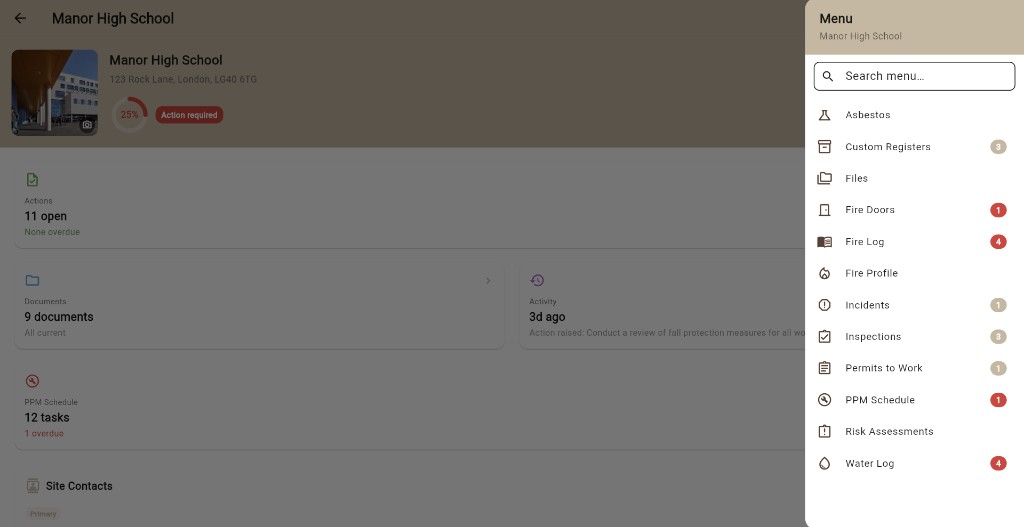
Building Safety Act & golden thread
For higher-risk buildings. Record HRB status, BSR registration, key building information, building assessment certificate deadlines and dutyholders. The golden thread register tracks every statutory information category, shows gaps and overdue reviews, and exports an index. Build and issue a versioned safety case report, and keep a mandatory occurrence log. See the Building Safety module.
Compliance reporting
One PDF for the whole portfolio: a red, amber, green score for every site, lowest first, then every overdue action, expired document and overdue maintenance task. Carries your logo, ready for a board or committee pack. Every PDF the portal produces, from fire logs to safety cases, is branded with your company logo.
Risk assessments
Create risk assessments with a 5x5 matrix. Draft with AI from a short subject or build line by line. Save reusable templates manually or with AI and use them across sites. Set review dates, publish to your team and send actions to the action list. Works offline on site. Separate from formal consultant assessments in Lytom Assess.
Offline on site
Poor signal in plant rooms and basements is normal. Complete site inspections, risk assessments, water logs, fire door checks and register inspections offline on a phone or tablet. Your work is saved on the device and uploads when you are back online.
Compliance dashboard
A live overall score for the whole estate, broken into what's on track and what needs attention. No digging through folders to find out where you stand.
Planned preventive maintenance
Schedule and track recurring maintenance tasks on a visual chart with week, month or year views. See what's coming up, what's overdue and what's done.
Fire door inspections
Log every fire door in the building, record inspections, flag defects and track remediation. Checks can be completed offline on site and sync when you are back online.
Fire log
Record fire alarm tests, emergency lighting checks, extinguisher servicing and all other statutory fire maintenance. Fully dated and auditable.
Incident reporting
Report accidents, near misses and dangerous occurrences quickly on any device. Records are structured, searchable and ready for RIDDOR reporting if required.
Water & legionella logs
Record outlet flushing, temperature checks, showerhead descale, tank inspections and competent person visits. Store consultant certificates, maintain your water asset register, and build portal water risk assessments when you need them. See water and legionella management in Comply.
Contractor monitoring
Log contractor visits, record the work carried out and keep a dated record of who was on site and when. Everything you need if a question comes up later.
Permits to work
Issue, manage and close hot work, confined space, working at height and other permits digitally. No paper, no lost forms, a permanent audit trail.
Document management
Upload certificates, policies and supporting records to the relevant site. Review dates are tracked and you get alerts before anything expires or lapses.
Action tracking
Every action has a due date and a status, and can be assigned to a named team member. Open actions appear on the dashboard; closing an action with evidence updates your compliance score automatically.
Custom registers
Fire doors and extinguishers are built in. Build your own registers for anything else: PPE, first-aid kits, spill kits, ladders, lifting equipment, hand tools. Each register has its own fields, photos, frequency and table-style export.
Custom inspections
Build your own inspection checklist per register. Add check questions manually or use AI to generate them from a short description. Failed checks raise an action automatically. A register's PPM row only closes when every item in the register has been inspected this round.
Golden thread, safety cases and HRB compliance in the same portal as everything else
If you are the Principal Accountable Person or Accountable Person for a higher-risk building, the information the Building Safety Regulator expects you to hold is already spread across your fire logs, fire door checks, documents, PPM and actions. The Building Safety module ties it together per building, so the golden thread is maintained as a by-product of day-to-day work rather than a separate exercise.
HRB status and registration
Record height, storeys and residential units and check the building against the section 65 threshold. Track BSR registration, the key building information submission and its 28-day deadline, and building assessment certificate status with the application deadline once BSR directs you to apply.
Dutyholders
Principal Accountable Person, Accountable Persons and the part of the building each is responsible for, plus the Responsible Person under the Fire Safety Order, managing agent and building safety lead. All printed on the safety case report.
Golden thread register
One register across the statutory information categories in the Higher-Risk Buildings (Keeping and Provision of Information etc.) Regulations 2024, from registration and KBI through fire strategy, structural information, plans, resident engagement and complaints. Each record says where the information is held, its version and date, who is responsible and when it is next reviewed. Coverage, gaps and overdue reviews are shown at a glance, and every change is kept in history. Export an index PDF for the regulator or an auditor.
Safety case report
Built section by section against the Higher-Risk Buildings (Management of Safety Risks etc) Regulations 2023 and BSR's assessment criteria, with guidance for each section. Issue numbered versions with a summary of what changed, why, and whether BSR was notified. The exported PDF includes golden thread coverage, open actions, the occurrence log and the revision history as appendices.
Mandatory occurrence reporting
Log fire and structural safety occurrences, the immediate actions taken, and when they were reported to BSR with the reference. Open occurrences not yet reported are flagged on the building overview.
Statutory arrangements
Keep a dated record of whether the resident engagement strategy, mandatory occurrence reporting system and building safety complaints procedure are in place and when they were last reviewed, so the overview answers the first questions a regulator asks.
Buildings that are not higher-risk still get the same module for fire safety management plans, evacuation strategies, plans and risk assessment records. Nothing is locked away behind the HRB designation.
Works with Lytom Assess
If your health and safety consultant uses Lytom Assess, data flows both ways automatically. Risk assessments, outstanding actions and issued reports from the consultant app appear directly in your Lytom Comply portal. No re-keying, no emailing spreadsheets, no chasing.
Assessments flow in
When your consultant completes a risk assessment in Lytom Assess, it appears in your portal. Actions raised in the assessment are tracked against your compliance score until they are closed.
Documents flow both ways
Certificates you upload to Lytom Comply are visible to your consultant when they carry out their next assessment. They review current records, not whatever was in their notes from last time.
Review dates sync to PPM
Document review dates and inspection dates from the consultant's assessment automatically populate your PPM schedule, so maintenance timelines stay accurate without manual entry.
No duplicate accounts
Your consultant manages the connection. You get a separate login with your own view: you see your compliance data, they see the assessment workspace. No shared passwords.
Don't have an H&S consultant yet? Lytom Comply works as a standalone compliance record system. When you appoint a consultant using Lytom Assess, it connects automatically.
Sign up directly
Go to lytom.app/portal and create an account. Start your 14-day free trial. No consultant required.
Via your consultant
If your health and safety consultant uses Lytom Assess, they can set up your account and invite you.
Start your free 14-day trial
Every module included. Cancel any time.
Sign up Talk to usAlready have an account? Sign in
Questions? Email support@lytom.app
Frequently asked questions
What is Lytom Comply?
Lytom Comply is health and safety compliance management software for businesses, housing providers and councils. It gives you a single portal to track PPM schedules, fire door inspections, fire logs, incidents, permits to work, contractor visits, water and legionella logs, documents and actions across all your sites, plus a Building Safety Act module with golden thread register, safety case reports and mandatory occurrence log for higher-risk buildings.
Does Lytom Comply support the Building Safety Act and the golden thread?
Yes. Each building has a Building Safety area covering higher-risk building status against the 18 metre / 7 storey threshold, BSR registration, key building information, building assessment certificate deadlines and dutyholders. The golden thread register tracks every statutory information category from the Higher-Risk Buildings (Keeping and Provision of Information etc.) Regulations 2024, showing coverage, gaps, where each record is held, version and review dates, with a change history and an exportable index. A mandatory occurrence log records fire and structural safety occurrences and whether they have been reported to the Building Safety Regulator.
Can Lytom Comply produce a safety case report?
Yes. The safety case report is built section by section against the Higher-Risk Buildings (Management of Safety Risks etc) Regulations 2023 and the Building Safety Regulator's assessment criteria, with guidance for each section. Issue it as a numbered version with a summary of revisions and a record of whether BSR was notified, then export a PDF with your own logo that includes golden thread coverage, open actions, the occurrence log and the revision history as appendices.
Can I get a compliance report across all my sites?
Yes. The portfolio compliance report is one PDF with a red, amber, green score for every site, lowest first, followed by every overdue action, expired document and overdue maintenance task per site. It carries your company logo and is designed to go straight into a board or committee pack.
How is Lytom Comply different from Lytom Assess?
Lytom Assess is used by health and safety consultants to carry out risk assessments and produce branded PDF reports. Lytom Comply is used by the businesses those consultants serve. It's the operational compliance portal where day-to-day records, inspections, maintenance schedules and incident logs are managed. The two products are connected: assessments and actions from Lytom Assess flow automatically into Lytom Comply.
Can I use Lytom Comply outside the UK?
Yes. Businesses use Lytom Comply internationally. Edit inspection templates, risk assessments, registers and record types to match your local legislation. UK examples in the product are starting points, not limits.
Is there a free trial?
Yes. Every new account starts with a 14-day free trial. No card needed to get started. Cancel any time.
Can I use Lytom Comply without a health and safety consultant?
Yes. Lytom Comply works as a standalone compliance record system for any business. Sign up at lytom.app/portal to start a free trial. When you appoint an H&S consultant using Lytom Assess, the integration activates automatically and assessments and actions flow straight into your portal.
How do I get access to Lytom Comply?
Sign up directly at lytom.app/portal and start a 14-day free trial. Alternatively, if your health and safety consultant uses Lytom Assess, they can set up your account and invite you.
What does the compliance dashboard show?
The compliance dashboard shows an overall score across the estate, open and overdue actions, overdue documents, how many documents are current and how many actions your team has closed. You get a clear view of what's working alongside what needs dealing with.
Is Lytom Comply secure and GDPR compliant?
Yes. Lytom Comply is GDPR compliant. All data is encrypted in transit and at rest. Each company's data is fully isolated. Access is controlled by secure, individual login. No shared accounts.
Does Lytom Comply work on mobile?
Yes. Lytom Comply is a web app that runs in any modern browser on phone, tablet, laptop or desktop. iOS, Android or Windows. No app download required. On phone and tablet you can also complete key site forms offline and sync when back online.
What is a custom register?
A custom register is a list you build yourself for any equipment or facility on your site that needs inspecting. Fire doors and fire extinguishers are built in. With custom registers you can add a PPE register, first-aid kit register, spill kit register, ladder register, lifting equipment register or anything else you have lots of and need a record for. Each register can have its own fields, its own inspection questions and its own schedule.
Can Lytom Comply produce risk assessments?
Yes. Lytom Comply includes a risk assessment tool with a 5x5 matrix. Type a subject (for example, office DSE, manual handling or lone working) and AI can draft an assessment, or you can build it line by line. Custom templates can be created manually or with AI and reused across sites. You review, edit, set review dates and publish. Actions can be sent to the action list automatically. Portal assessments are separate from formal consultant assessments in Lytom Assess.
How does the PPM schedule treat custom registers?
There is one PPM row per custom register definition per site, not one row per item. A register's PPM row is only marked complete when every item in the register has been checked since the round began. That keeps the PPM schedule readable on sites with hundreds of items in a single register.
Does Lytom Comply use AI?
Yes, in two specific places. AI can generate check questions for a custom inspection from a short description. AI can draft a risk assessment from a short subject prompt using a 5x5 risk matrix. Custom templates can also be built manually or with AI. You review and edit before anything is saved. AI does not auto-publish. Final decisions stay with the person using the portal.
Can I complete site inspections offline?
Yes. Open your sites once while online so templates are cached. You can then complete site inspections, risk assessments, water logs, fire door checks and custom register inspections offline in the browser on a phone or tablet. Work is saved on the device and syncs when you are back online. AI, billing and consultant tools still need a connection.
When your consultant uses Lytom Assess, records sync automatically
If your H&S consultant uses Lytom Assess, the assessments and actions they raise appear in your Comply portal automatically. No PDFs to file, no spreadsheets to update. The connection between the two is Lytom Linked.
Lytom Assess
For independent health and safety consultants. Run risk assessments on site, issue branded PDF reports and manage every client. iOS and web app.
Visit Lytom Assess → You are hereLytom Comply
For businesses and housing providers. PPM, fire doors, incidents, permits, water logs, custom registers, risk assessments and Building Safety Act golden thread and safety cases across every site.
Current page